DIY Intranet Home — Solution Overview
Product: DIY Intranet Home by SharePoint Designs
Version: 1.0.0.0
Compatible with: SharePoint Online (Microsoft 365)
What Is DIY Intranet Home?
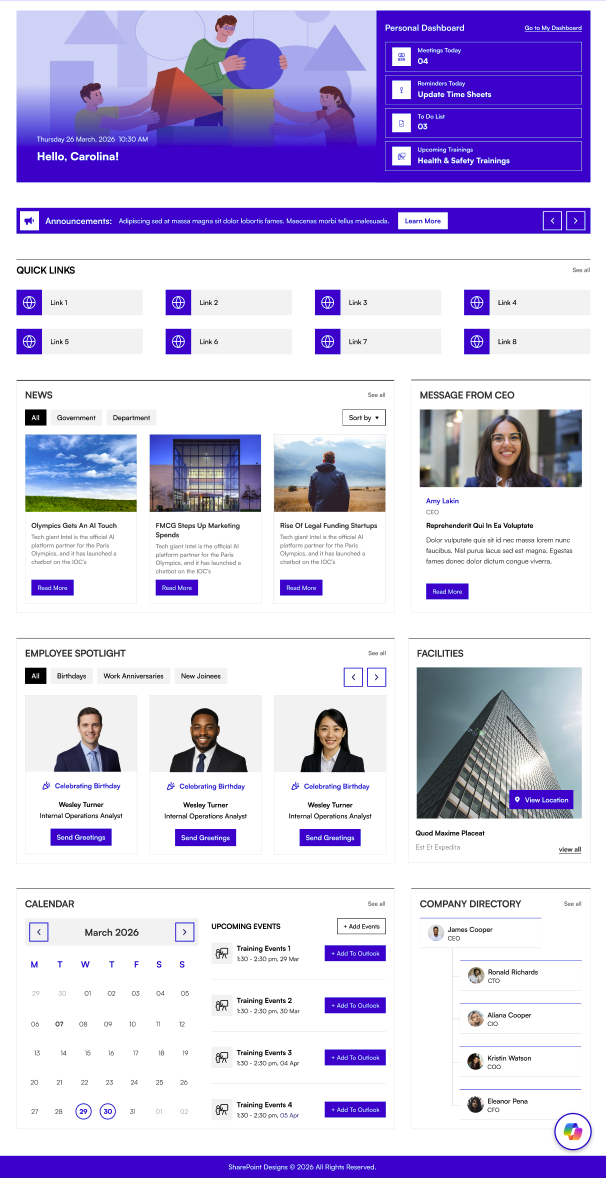
DIY Intranet Home is a ready-to-use SharePoint intranet solution that turns a blank SharePoint site into a fully featured company home page — without any custom development.
It comes with nine purpose-built web parts that you can add to any modern SharePoint page. Each web part is self-contained, independently configurable, and designed to work together to create a polished employee experience.
Who Is It For?
| Audience | How they use it |
|---|---|
| Site owners / administrators | Add web parts to pages, configure settings, upload images, manage content through the settings panel |
| End users / employees | View personalised greetings, read news and announcements, find events, explore the org chart, and access quick links |
| IT / deployment team | Install the solution package to the App Catalog and approve API permissions |
What Does It Include?
DIY Intranet Home includes nine web parts that you can place anywhere on a SharePoint page:
| Web Part | What it does |
|---|---|
| Welcome Banner | Greets each employee by name with a live clock and a customisable background image. Also shows personal dashboard cards for meetings, tasks, and training. |
| Announcement | Displays a rotating carousel of company announcements. Each announcement can have a link, expiry date, and optional icon image. |
| Featured News | Shows news posts from one or more SharePoint sites in a variety of layouts. Supports filtering by category, search, and RSS feeds. |
| Common Tools | A quick links panel for apps and tools your team uses every day — with icons, hover effects, and two display styles. |
| Employee Spotlight | Highlights upcoming birthdays, work anniversaries, and new joiners, pulled automatically from your organisation's Active Directory. |
| Org Chart | Draws an interactive reporting tree from your company's directory. Hover over any person to see their contact details. |
| Upcoming Events | Shows events from a SharePoint calendar, a shared mailbox, or a user's own Outlook calendar. |
| Facilities | Showcases your company's offices and facilities with photos, descriptions, and map links. |
| Message from CEO | Displays a leadership message with a profile photo, title, and expandable content panel. |
It also includes a SetUp Wizard that walks you through provisioning the site on first use — creating the required lists, applying branding, and placing web parts on the page automatically.
Key Highlights
- No coding required. All configuration is done through the SharePoint settings panel on the right-hand side of the page.
- Consistent design. Every web part follows the same look-and-feel and respects your site's theme colours automatically.
- Two layouts per web part. Switch between Standard and Accent Bar layouts with a single dropdown — no page rebuilding needed.
- Theme-aware colours. The colour pickers in each web part pull from your site's theme palette, so colours always stay on-brand.
- Live previews. Colour selections show a preview swatch before you save.
- Loading states. All web parts show a smooth shimmer animation while data is loading, instead of a blank page.
Supported Microsoft 365 Environments
- SharePoint Online modern pages