Overview
What Is DIY Sangha Employee Onboarding?
DIY Sangha Employee Onboarding is a ready-built SharePoint solution that gives your HR team and new employees a structured, task-based onboarding experience on a dedicated SharePoint page. Admins configure onboarding task templates and employee records using SharePoint lists, and the web part presents the right checklist to each new joiner — all within their familiar SharePoint environment.
Who Is This For?
| Audience | How They Use It |
|---|---|
| HR / People Team (Admins) | Create and manage onboarding task templates, set up employee records in the list and review progress in Admin view |
| New Employees (Users) | Log in and see their personal onboarding checklist with tasks to complete |
| Site Owners | Deploy the page, configure the web part to point to the right lists, and manage access |
What's Included?
| # | Web Part | Description |
|---|---|---|
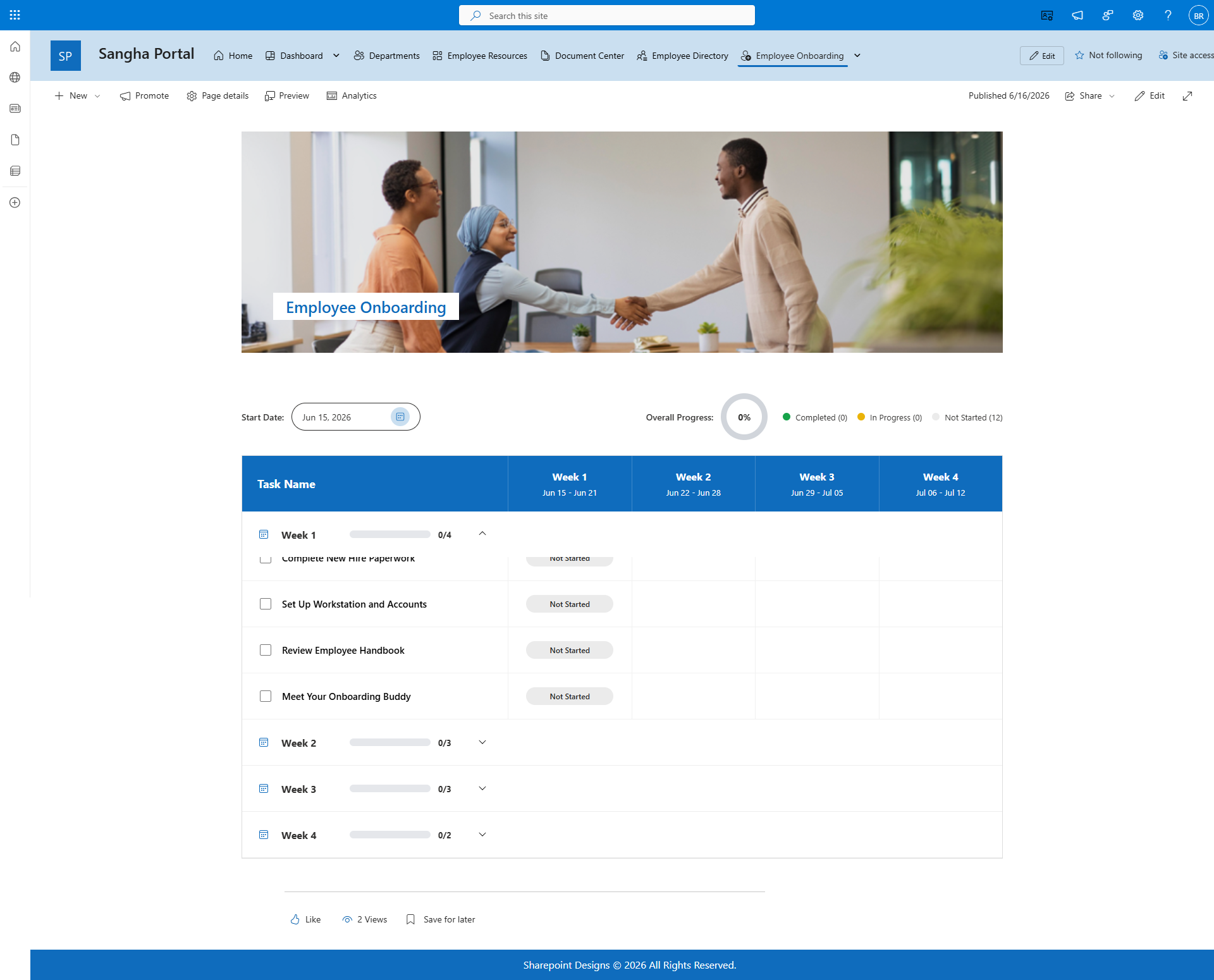
| 1 | Employee Welcome | Hero banner with a background image and a welcome heading for the onboarding page |
| 2 | Employee Onboarding | Task-based onboarding tracker that connects to SharePoint lists for templates and employee records, with separate Admin and User views |
Key Highlights
- Template-Driven Tasks - Onboarding tasks are defined in a SharePoint list template, making it easy for HR to update the checklist without changing the web part.
- Dual View Mode - Admins see all employees and their task progress; new employees see only their own checklist.
- SharePoint List Integration - Connects to three SharePoint lists: onboarding tasks, employee records and the task template, all of which can be managed through familiar SharePoint list views.
- Branded Welcome Banner - A full-width hero banner with a customisable background image sets the tone for new joiners.
- No Coding Required - All settings are managed through the web part settings panel and standard SharePoint lists.
Microsoft Graph Permission Required
| Permission | Purpose |
|---|---|
| User.Read.All | Reads Microsoft 365 user profiles to match new employees to their onboarding records |
This permission must be approved by a Global Admin or SharePoint Admin in the SharePoint Admin Centre after the package is deployed.
How It Works
- HR creates onboarding task items in the Onboarding Task List and defines a task template in the Onboarding Tasks Template list.
- When a new employee joins, HR adds them to the Employee List.
- The Employee Onboarding web part reads these lists and shows each new joiner their personalised checklist.
- New employees tick off tasks as they complete them. Admins can monitor progress across all employees.
Supported Environments
- SharePoint Online (Microsoft 365)
Screenshots
Version
Current Version: 1.0.1.0 Developed by: SharePoint Designs — www.sharepointdesigns.com