Overview
Product: Dashboard Suite by SharePoint Designs Version: 0.0.1 Package Version: 1.0.0.0 SharePoint Framework Version: 1.22.2 Compatible with: SharePoint Online (Microsoft 365)
What Is It?
The Dashboard Suite is a collection of two complementary SharePoint web parts — Intelligence Dashboard and Personal Dashboard — built on Microsoft Copilot and Microsoft Graph. Together they give organisations a complete picture: site administrators get AI-powered content intelligence and analytics, while every employee gets a personalised daily productivity hub.
Both web parts install independently so organisations can deploy one or both, and each connects to live Microsoft 365 data so the information is always current — no manual updates required.
Who Is It For?
| Audience | How They Use It |
|---|---|
| Site Owners | Use the Intelligence Dashboard to monitor site performance, track trending content, and act on AI-powered content suggestions |
| Intranet Administrators | Use the Intelligence Dashboard to review content health, manage auto-generated article drafts, and understand engagement metrics |
| Content Managers | Use the Intelligence Dashboard to receive Copilot-generated writing briefs and topic recommendations aligned to the site's audience |
| Communications Teams | Use the Intelligence Dashboard's auto-draft feature to publish birthday, work anniversary, and new joiner articles at scale |
| Employees | Use the Personal Dashboard every day to see meetings, tasks, team availability, birthdays, holidays, and training — all in one place |
| Managers | Use the Personal Dashboard to check which direct reports are available, in a meeting, away, or out of office in real time |
| HR & People Teams | Use the Personal Dashboard to surface upcoming birthdays automatically so no milestone goes unnoticed |
| Learning & Development Teams | Use the Personal Dashboard to ensure employees can see their outstanding Viva Learning assignments alongside their daily priorities |
Web Parts Included
| # | Web Part Name | Type | One-Line Description |
|---|---|---|---|
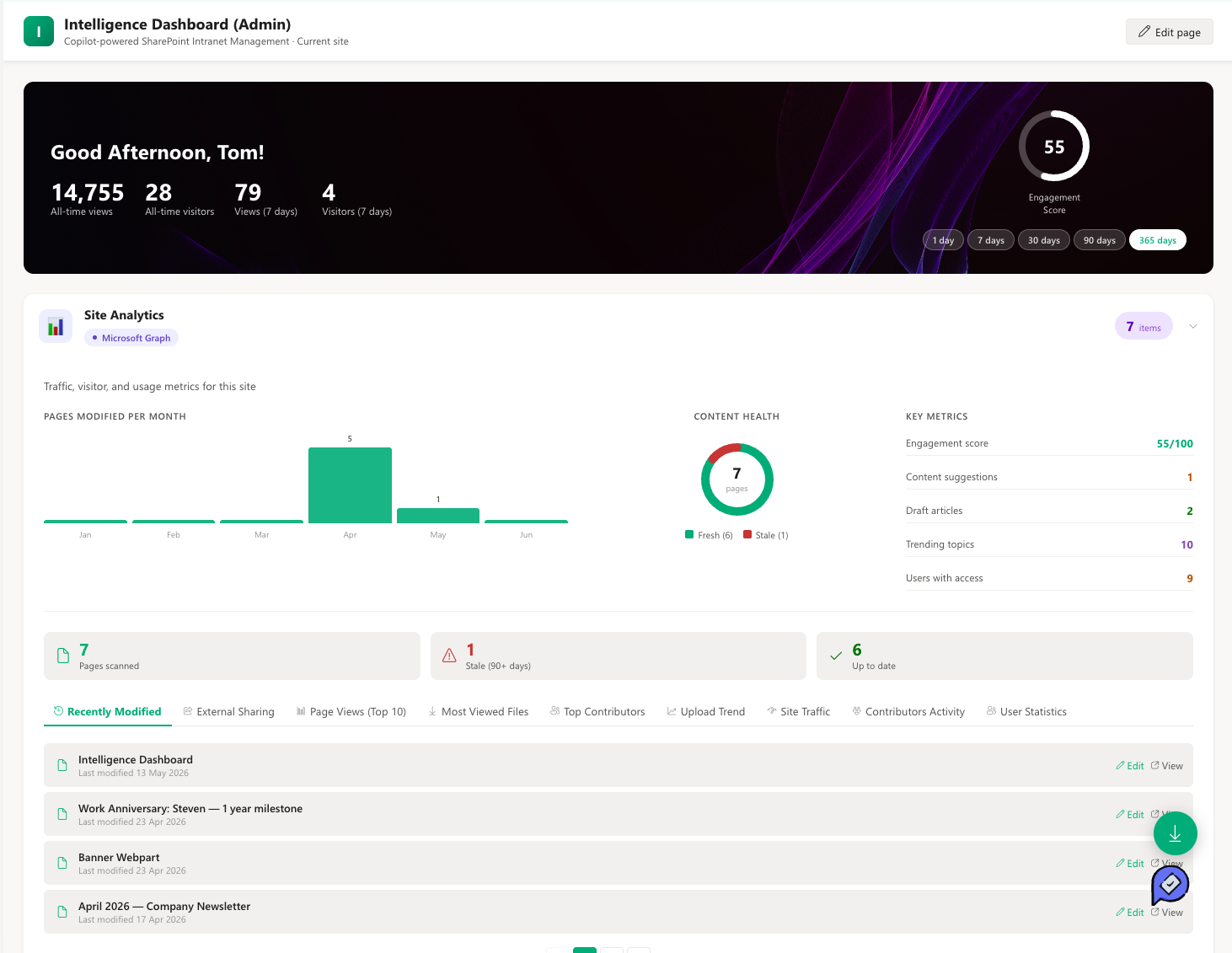
| 1 | Intelligence Dashboard | Web Part | An AI-powered intranet command centre surfacing site analytics, Copilot content suggestions, auto-drafted articles, and trending topics for administrators and content owners |
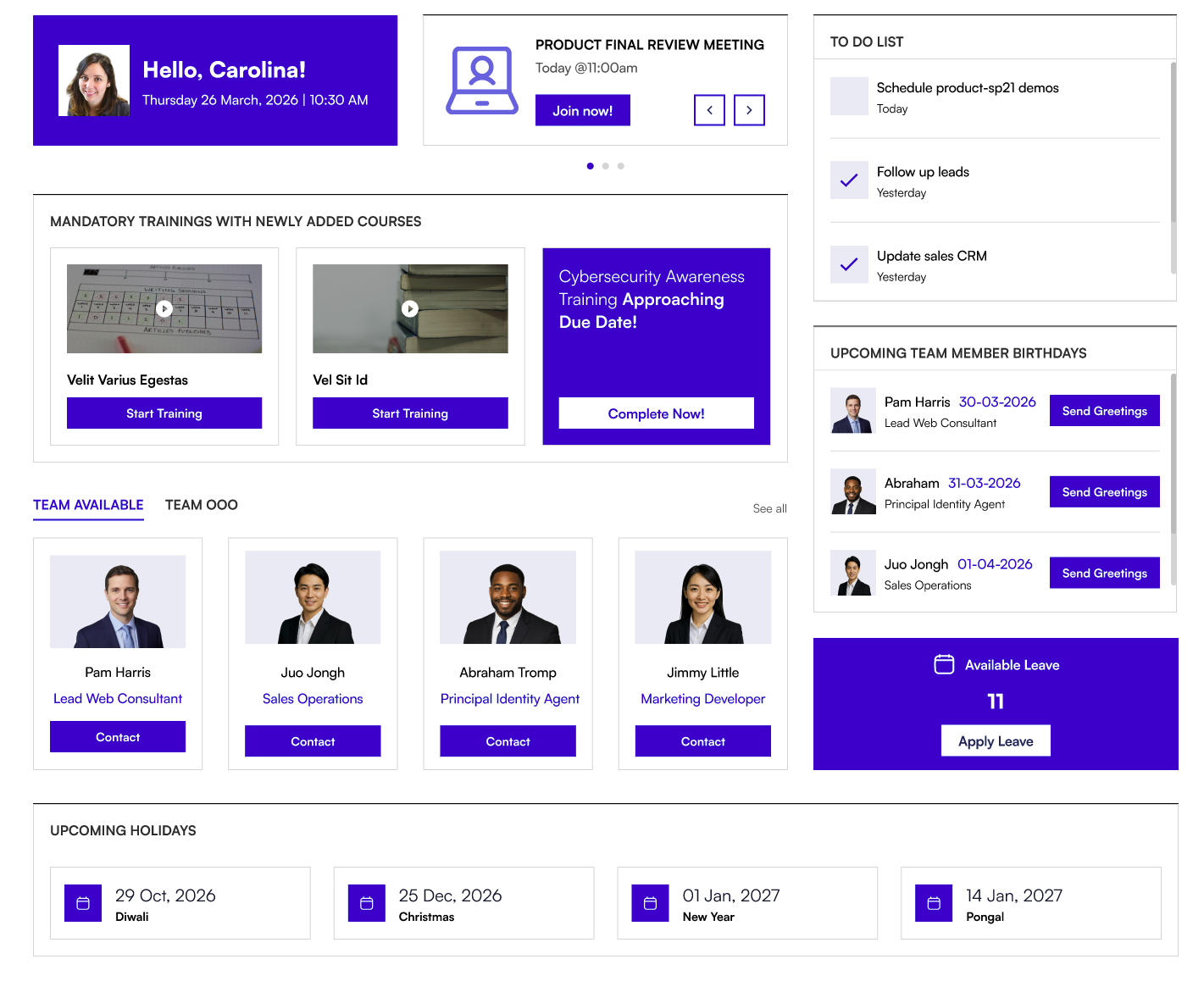
| 2 | Personal Dashboard | Web Part | A personalised daily productivity hub showing each employee's meetings, Planner tasks, team presence, upcoming birthdays, public holidays, and Viva Learning assignments |
Key Highlights
Intelligence Dashboard
- Real-time site analytics — All-time and last-7-days page views and unique visitors at a glance
- AI content suggestions — Microsoft Copilot surfaces actionable recommendations based on site activity and organisation signals
- Auto-generated drafts — Ready-to-review article drafts created automatically for birthdays, work anniversaries, and new joiners
- New content recommendations — Copilot-generated topic briefs and outlines tailored to the site's audience
- Trending topics — What the organisation is reading and searching, powered by Microsoft Graph Insights
- Card ordering and visibility — Show, hide, and reorder any dashboard card from the settings panel
- Custom banner image — Upload a branded banner to match the site's identity
Personal Dashboard
- Today's meetings — All calendar events for the day with direct Teams and Office join links
- Planner task management — View, create, and mark tasks as complete without leaving the intranet
- Team presence — Real-time availability indicators for each manager's direct reports
- Upcoming birthdays — Team member birthdays within a configurable window (30, 60, or 90 days ahead)
- Flexible holiday calendar — Supports Outlook's holiday calendar, a SharePoint Events list, or a shared calendar mailbox
- Viva Learning assignments — Outstanding training courses with due dates and direct links
- Multiple layouts — Standard and Accent Bar layout styles to match the site's visual design
- Hideable header — Toggle the web part title off for a cleaner, app-like appearance
Supported Microsoft 365 Environments
| Environment | Intelligence Dashboard | Personal Dashboard |
|---|---|---|
| SharePoint Online | Yes | Yes |
| SharePoint Modern Pages | Yes | Yes |
| SharePoint Full-Page Layout | Yes | Yes |
| SharePoint 2019 / on-premises | No | No |
Dashboard Cards at a Glance
Intelligence Dashboard Cards
| Card | What It Shows |
|---|---|
| Site Analytics | Total page views, unique visitors, and 7-day trend data for the current site or organisation |
| Content Suggestions | AI-generated, actionable recommendations for content to create, update, or promote — each with a confidence rating |
| Auto Generated Drafts | Pre-written article drafts for upcoming birthdays, work anniversaries, and new team members — ready to review and publish |
| New Content Recommendations | Copilot-sourced topic briefs and outlines based on trending signals and industry content |
| Trending in Your Organisation | The most-read and most-searched content across the organisation from Microsoft Graph Insights |
Personal Dashboard Cards
| Card | What It Shows |
|---|---|
| Welcome | A personalised greeting for the signed-in user based on time of day |
| Today's Meetings | All calendar events for today, with join links for online meetings |
| My Tasks | Active Planner tasks — view, create, and mark as complete |
| Team Availability | Real-time presence and out-of-office status for the manager's direct reports |
| Upcoming Birthdays | Team members with birthdays within the configured notification window |
| Public Holidays | Upcoming public holidays from the selected holiday calendar source |
| My Training | Outstanding Viva Learning assignments, including urgent deadlines |
Screenshots
📸 View Intelligence Dashboard
📸 View Personal Dashboard